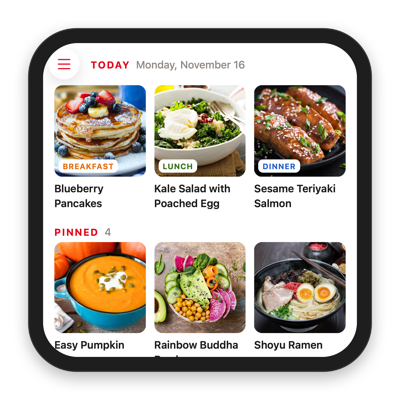
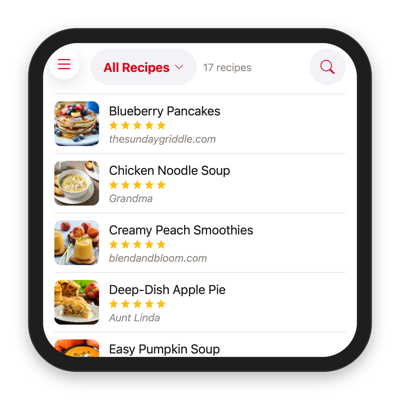
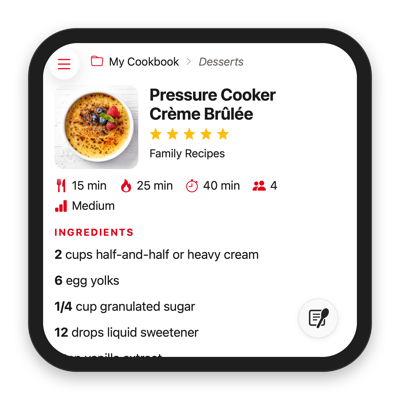
If you just got an Apple HomeView, you can now try Paprika for HomeView, a new way to view your recipes, grocery lists, pantry, and meal plan right on your kitchen counter.
Apple hasn’t said whether they will allow recipe apps like Paprika to run on HomeView via CarPlay, so instead we have created a mini web app that allows you to access your Paprika account directly through HomeView’s Safari browser.
Sign in - Sign in with your Paprika account’s email and password.
Pin the site - After signing in we recommend pinning the site in Safari so you can easily get back to it.
What You Can Do
Home - See today’s meals and your currently pinned recipes.
Recipes - Browse your recipes by cookbook and category, or search by name.
Groceries - Check your grocery lists, sorted by aisle.
Pantry - See what’s in each of your pantry locations.
Meals - View your meal plan a day at a time.
Start Cooking
Open any recipe and tap Safari’s Start Cooking button in the corner of the screen to switch to HomeView’s cooking mode, which walks you through the recipe one step at a time.
Calendar Feeds
If you’ve subscribed to your meal plan in the Calendar app with Paprika 4’s new calendar feed premium feature, your scheduled meals will also appear directly in the Calendar app on the HomeView. Tap on the recipe link in the calendar entry to open that recipe directly in Paprika for HomeView.
Beta Information
Paprika for HomeView requires a Paprika account and is available to all account holders while it is in beta. After the beta ends, a Paprika 4 premium subscription will be required for continued access.
The initial beta version is also read only and designed as a viewer for the data in your app. To add recipes or change your meal plan, grocery lists or pantry, use Paprika on your phone, tablet or computer, and your changes will show up on HomeView once they’ve synced. If there is sufficient interest, we will consider expanding the web interface further to support editing in the future.
Paprika 4 has officially been released for iOS, macOS, Android and Windows. Thank you to everyone who participated in our beta and submitted feedback over the past few months.
Paprika 4 is now free to download on all platforms, and you no longer have to purchase each version separately.
Free Upgrades
If you’ve purchased any previous version of Paprika, you will automatically receive a free upgrade to the standard version of Paprika 4, which includes:
A new interface - A refreshed design throughout the app.
Cook mode - Follow a recipe step by step.
Cookbooks - Organize recipes into cookbooks.
Pantry locations - Keep track of the fridge, freezer, and pantry.
Advanced search - Combine rules to find the right recipe.
Duplicate finder - Find and remove duplicate recipes.
iOS and macOS users also receive the following free upgrades:
Widgets - See grocery lists and meals at a glance.
Shortcuts - Control Paprika with the Shortcuts app.
Siri AI - Paprika is now compatible with Siri AI on iOS 27.
iPhone Duo - Support for iPhone Duo on iOS 27.
We’ve also made a bunch of minor improvements throughout the app. For a detailed list of changes, check out the What’s New section of our updated User Guides below.
Premium Features
For those who want more, we are introducing an optional premium subscription that adds the following features:
Social media importing - Save recipes from TikTok, Instagram, Facebook, and YouTube.
Recipe scanning - Scan a cookbook page or recipe card.
Family accounts - Invite family members to join your account.
Barcode scanning - Add groceries and pantry items by scanning their barcodes.
Alexa integration - Add groceries with Alexa and view recipes on your Echo Show.
Nutritional analysis - Calculate a nutrition label from a recipe’s ingredients.
Category suggestions - Find the right categories for a recipe.
Calendar feeds - Sync your meal plan to Apple, Google, or Outlook calendars.
Clipboard importing - Turn copied text into a recipe.
Direct messaging - Send recipes and cookbooks to other Paprika users.
Your premium subscription gives you access to all versions of Paprika on all your devices. With the family accounts
feature, you can invite your family members to share your subscription on their devices as well.
We are launching Paprika 4 Premium at an introductory price of $14.99/year with a 7-day free trial. Existing users are eligible for a discounted
upgrade price of $9.99/year. (Prices are listed in US Dollars
and will vary by region if you are not in the US.)
If you have an Alexa Echo Show device and are interested in testing our Alexa skill, we currently have some Alexa beta tester slots available.
You will need the Alexa app and Paprika 4 installed on your phone or tablet to complete the Alexa account linking process.
Update (October 7, 2026): The Paprika Recipe Manager skill is now available to all Paprika 4 beta testers, so you no longer need to request Alexa beta access separately. Enable the Paprika Recipe Manager skill in the Alexa Skills store, then see the Alexa section of our User Guide for how to link your Paprika account and everything you can do with the skill.
Update (October 8, 2026): Just to clarify, the Alexa skill is available to registered Paprika 4 beta testers only. Furthermore, as with the other Paprika 4 beta features, the Alexa skill is free to test during the beta period but will require a subscription to access after the beta period ends.
Thank you to everyone who has been testing Paprika 4 so far. We’ve gotten some really helpful feedback and also finished up a couple of features that didn’t make it into the initial beta. As we get closer to release we are now opening up beta access to all current users.
What’s New in Paprika 4
Recipes
Recipe scanning - Choose a photo of a cookbook page or recipe card and let Paprika scan the recipe.
Social media importing - Save recipes from TikTok, Instagram, Facebook and YouTube.
Clipboard importing - Copy text from an email, document, or message, and let Paprika extract the recipe.
Cookbooks - Organize your recipe collection into cookbooks and share them with other Paprika users.
Advanced search - Search for recipes based on prep time, servings, rating, categories, etc. Combine rules to refine the results and save searches for reuse.
Category suggestions - Automatically suggest categories for a recipe based on its ingredients.
Nutritional analysis - Calculate a recipe’s nutritional information using USDA ingredient data and display a nutrition label.
Duplicate finder - Find recipes you’ve saved more than once and clean them up in one step.
Sharing
Family sharing - Invite family members to join your account. Each user gets their own login, and everyone shares the same recipes, grocery lists, meal plan, etc.
Direct messaging - Send your recipes directly to other Paprika users without having to email or export.
Pantry
Extra pantry locations - Keep track of what’s in the fridge, the freezer and the cupboard separately.
Barcode scanning - Add items to the pantry by scanning their barcodes with Paprika (mobile versions only).
Meals
Calendar feeds - Subscribe to your meal plan in Apple Calendar, Google Calendar, Outlook or other calendar apps.
Integrations
Alexa integration - Ask Alexa to add items to your grocery list, show your meal plan, or view recipes on your Echo Show.
iOS/macOS integration - Add new widgets for the grocery list and meal planner, use Paprika with Siri and Shortcuts, and search for recipes in Spotlight.
We’ve also refreshed the user interface, updated the app icon, and made a bunch of minor improvements to the app. For a detailed list of changes check out our updated User Guides below.
Note: All new features are available for testing during the beta period. Afterwards, premium features will require a subscription.
How to Participate
Sign Up - Fill out the beta signup form to enable beta access for your Paprika account.
Download - Download the beta versions using the links on our beta downloads page.
Start Testing - Follow the beta testing instructions in our updated User Guides: iOS, macOS, Android, Windows.
Thanks everyone who signed up for the Paprika 4 beta. Paprika 4 is now ready for testing.
What’s New in Paprika 4
Soclal media importing - Import recipes directly from Instagram and TikTok using the share button.
Recipe photo scanning - Scan recipe photos from your camera or photo library.
Family member accounts - Invite your family members to join your account. All family members will share the same recipes, grocery lists, meal calendar, etc.
Direct messaging - Share your recipes directly with other Paprika users using the Message option without having to email or export Paprika files.
Cookbooks - Organize your recipe collections into cookbooks and share them with other Paprika users.
Barcode scanning - Add items to the pantry by scanning their barcodes.
Multiple pantry locations - Add extra pantry locations for tracking freezer or other items.
Alexa integration - Ask Alexa to add items to your grocery list, show your meal plan, or view pinned recipes on your Echo Show.
Note: All new features are available for testing during the beta period. Afterwards, these features will require a premium subscription.
If you previously filled out our signup form you will receive an email with further instructions and download links.
The initial round of beta invites have already been sent out and the beta test program is full for now. If you did not receive an invite, don’t worry, we will send out additional invites as the beta progresses. You can still fill out the beta signup form to indicate your interest in participating in a later round.